



How to Choose a Pocket Photo Printer for Journaling and Travel
Most travel photos never leave the camera roll. You take dozens during a trip, save a few favorites, and eventually they become part of a much larger photo library.
A travel journal gives those photos a physical place. Printed pictures can sit beside tickets, handwritten notes, maps, receipts, or small keepsakes from the day. A portable photo printer can make that easier, but choosing one takes more than looking for the smallest model.
Print size, paper type, printing technology, phone compatibility, and the supplies you need later all affect how useful the printer will be.
How to Choose a Pocket Photo Printer for Journaling
Start with the journal rather than the printer.
Print Size Matters More Than It Sounds
A large photo may look great on its own but leave little room for writing. Smaller prints are easier to combine with notes, tickets, stickers, and other pieces on the same page.

Think about how you normally build a page. If one photo is the main focus, a larger format may work well. If you like mixing several elements together, a smaller photo gives you more flexibility.
Do not rely only on descriptions such as “mini” or “pocket-sized.” Check the actual media dimensions before buying.
Choose Photo Paper That Fits the Project
For journaling, the paper can matter almost as much as the printer.
Sticker-backed photo paper is useful when you want to print a photo and place it directly onto the page without carrying glue or photo corners. Standard photo paper still makes sense if you prefer tape, removable layouts, or other ways of attaching photos.
Also consider how thick the finished prints are. Adding several photos to every journal spread can make a notebook noticeably bulkier over time.
If durability matters, check the specifications for the exact photo paper you are buying. Water resistance, smudge resistance, tear resistance, and adhesion should not automatically be assumed for every compatible media type.
Make Sure the Phone Workflow Is Simple
Travel printing is usually built around a phone. You take a photo, choose the image you want, prepare it, and send it to the printer.
That makes phone compatibility an important part of the buying decision.

Check whether the printer supports iOS, Android, or both, and whether a dedicated app is required. If you plan to print during a trip instead of waiting until you get home, the app experience matters even more.
Bluetooth is useful for a portable setup, but Bluetooth support alone does not mean every printer works with every phone. Always check the supported devices first.
Compare Printing Technologies Without Looking for a Universal Winner
Pocket photo printers do not all create images in the same way.
ZINK printers use specially prepared paper without a separate liquid-ink cartridge. Dye-sublimation printers use a color-transfer process and their own consumable system. Compact inkjet printers use liquid ink, while some smartphone printers produce images on instant film.
Each approach comes with a different combination of print appearance, media, printer size, and replacement supplies.
For journaling and travel, there is no reason to choose a technology simply because it sounds more advanced. Look at the type of photo you want, the paper you prefer, and what you will need to replace after the included supplies run out.
Do Not Judge Photo Quality by DPI Alone
DPI is useful when comparing printer specifications, but it is not a complete measure of photo quality.
Resolution can affect how much detail a printer reproduces, especially when a photo is reduced to a small size. But the original image, color processing, printing technology, and photo paper also affect the result.
A higher DPI number should not be treated as proof that one printer will automatically look better than another.
For a journal, the practical question is simpler: can faces, scenery, and important details still be seen clearly at the size you intend to print?
Look at the Available Photo Paper
The printer determines how the image is made. The paper determines what you can do with it afterward.
A basic white photo paper may be all you need for a travel journal. Other projects may benefit from sticker, magnetic, heat-transfer, or water-transfer media.

NELKO's photo paper range, for example, includes formats designed for traditional photos as well as other creative applications.
That does not mean more paper types always make a printer better. If journaling is your main use, make sure the paper you expect to use most often is easy to buy and replace.
Think About the Real Cost of Printing
The printer price is only the first cost.
Depending on the technology, future prints may require photo paper, ink cartridges, ZINK paper, dye-sub consumables, or instant film.
Before buying, look at the supplies you expect to use and roughly calculate the cost per print. Also check whether replacement photo printer accessories are readily available.
A low printer price is less useful if the paper or cartridge you need later is difficult to find.
Where NELKO FLOW Fits
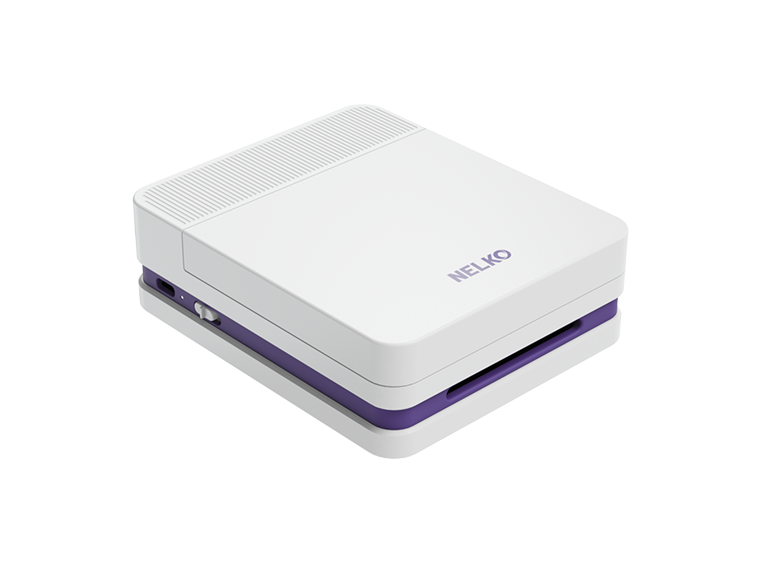
NELKO FLOW is designed for users who want small-format color printing with a phone-based workflow.
It uses Micro-Drop Inkjet technology with a specified resolution of 600 DPI. The printer measures 107 × 128 × 41 mm and uses 52.3 × 90 mm photo media.

FLOW connects through Bluetooth and supports compatible iOS and Android devices through the NELKO App. That makes it possible to keep the basic workflow on a phone instead of returning to a desktop computer whenever you want to print a photo.
For journaling, sticker-backed photo paper is one of the most straightforward options: print the image, remove the backing, and place it directly onto the page.
FLOW also supports other creative media, including magnetic, heat-transfer, and water-transfer photo paper. These are less important if you only want standard journal photos, but they give the same printer more uses outside the notebook.
That could mean turning a travel photo into a magnet, using a design on fabric, or creating another small DIY project from an image saved during the trip.
Who Should Consider NELKO FLOW?
FLOW makes the most sense for someone who wants a portable inkjet photo printer, prefers creating from a phone, and expects to use small photos for journals, scrapbooks, travel memories, or other creative projects.
It should not be chosen on the 600 DPI specification alone. Compare its inkjet workflow, photo media, available supplies, and finished print format with the other technologies you are considering.
The best pocket photo printer for journaling is ultimately the one that fits into the way you already create. If printing a photo takes too many steps, requires supplies you rarely have, or produces a format that does not fit your journal, portability alone will not make it useful.
A good setup should make it easier to move a memory from your phone onto the page—and leave enough room to tell the rest of the story.