



How to Make Vinyl Stickers at Home (Step-by-Step Guide)
Vinyl stickers are everywhere—on water bottles, laptops, and product packaging. People love them for their waterproof finish, durability, and professional look. But making them at home is often harder than expected. Issues like printer compatibility, wasted vinyl paper, and inconsistent results can quickly become frustrating.
Yes, you can make vinyl stickers at home—but it usually involves trial and error and multiple tools. In this guide, we’ll walk you through what vinyl stickers are, how to make them step by step, common mistakes to avoid, and a simpler way to print stickers at home using a vinyl sticker printer.

What Are Vinyl Stickers & Why They’re So Popular
Vinyl stickers are made from a plastic-based material designed for durability and long-term use. Unlike regular paper stickers, vinyl is built to withstand moisture, sunlight, and wear over time.
This is why vinyl stickers are commonly used for outdoor applications, product packaging, and items like water bottles or laptops. Their ability to maintain color and adhesion in tough conditions makes them a go-to choice for both personal and commercial use.
Because of these benefits, many people start searching for a printer for vinyl stickers or a reliable vinyl sticker printer machine when they want professional-quality results at home.
Can You Print Vinyl Stickers with a Normal Printer?
The short answer is yes—but only with the right setup.
Most people use inkjet printers to print vinyl stickers. These printers are widely available and compatible with vinyl sticker paper. They can produce high-quality color prints when paired with the correct settings.
Laser printers, on the other hand, have limited compatibility. The heat used in laser printing can damage vinyl paper or lead to poor results.
The key takeaway is that not all printers work equally well. Choosing the right printer for vinyl stickers or a vinyl sticker printer is essential. Many beginners run into problems here, often wasting time and expensive vinyl sheets in an effort to achieve consistent results.
What You Need to Make Vinyl Stickers
To make vinyl stickers at home, you’ll need a few essential tools.
Required
● Inkjet printer
● Printable vinyl sticker paper
● Design software
Optional:
● Cutting machine
● Lamination sheets
The challenge is that a full vinyl setup often involves multiple tools and steps. This increases both the cost and the learning curve, especially for beginners using a vinyl sticker printer machine for the first time.
How to Make Vinyl Stickers at Home (Step-by-Step)
Step 1: Design
Start by creating your design at high resolution (300 DPI recommended). Adjust layout, size, and colors carefully to match your final output.
Step 2: Test Print
Before using vinyl paper, print your design on regular paper. This helps you check alignment, size, and color without wasting materials.
Step 3: Print on Vinyl
Load your vinyl sticker paper correctly into the printer. Use the appropriate print settings (often “photo” or “high quality”) to achieve the best results with your vinyl sticker printer.
Step 4: Drying
Allow the print to dry completely. This step is crucial to prevent smudging, especially when printing inkjet-based vinyl stickers.
Step 5: Cutting
Cut your stickers either by hand with scissors or with a cutting machine for more precise shapes.
Step 6: Lamination (Optional)
Apply a laminate layer for extra protection. This improves waterproofing and scratch resistance.
Key insight: Even with the right printer for vinyl stickers, achieving consistent results often requires multiple test prints—one of the biggest frustrations in vinyl sticker printing.
Common Problems with Vinyl Sticker Printing
Vinyl sticker printing can produce high-quality results—but it’s not always beginner-friendly.

While vinyl sticker printing delivers excellent durability, it often comes with a steep learning curve. That raises an important question: Do you actually need a full vinyl-sticker printer setup for your use case?
Vinyl vs Simplified Sticker Printing
Traditional vinyl printing is designed for durability and professional-grade results—but it comes with its share of complexity.
Vinyl (Traditional Setup):
● Waterproof and durable
● Professional finish
● Requires vinyl paper
● Involves multiple tools and steps
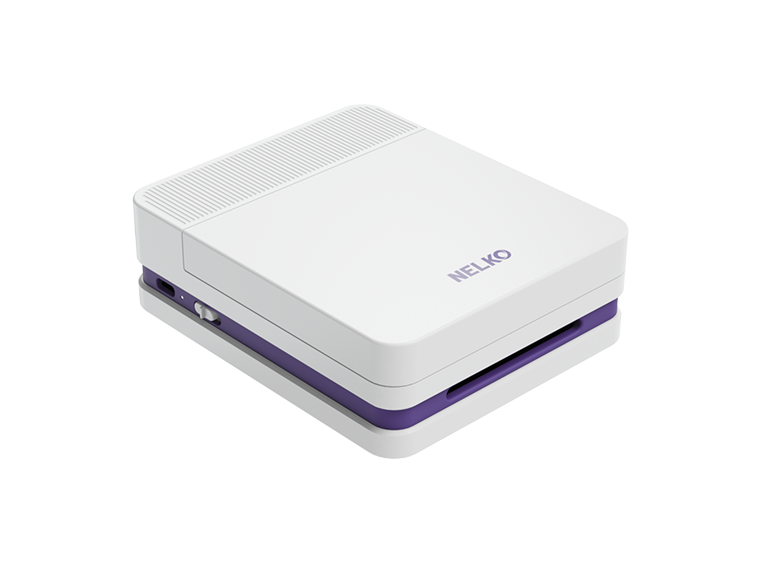
Simplified Printing (e.g., Nelko PP01):

Not every sticker needs a full vinyl setup.
While vinyl printing offers durability and professional quality, it’s not always the best choice for every project. If you’re creating stickers for everyday use, journaling, or creative projects, you can achieve amazing results with a simpler, more efficient printing solution. This allows you to skip the complex setup and focus on what really matters—your designs.

Decision guide:
● Need durability → choose vinyl
● Need simplicity → choose a streamlined printing solution instead of a traditional vinyl sticker printer machine
Tips to Reduce Waste & Improve Results
If you decide to use vinyl, these tips can help improve your success rate:
● Always do test prints before using vinyl paper
● Use the correct printer settings for your material
● Choose high-quality sticker paper for an inkjet printer
● Store vinyl sheets flat to prevent curling
Focusing on these basics can significantly reduce waste and improve overall print quality when using a printer for vinyl stickers.
Conclusion
Vinyl stickers are ideal for long-lasting, outdoor-friendly applications. They offer durability and a professional finish that standard stickers can’t always match.
However, they also require time, tools, and practice to get right. For many people, that level of complexity isn’t necessary.
If your goal is everyday sticker printing, journaling, or creative projects, a simpler, faster solution like the Nelko PP03 can often be a more efficient choice than investing in a full vinyl sticker printer setup.
FAQ
What printer works best for vinyl stickers?
An inkjet vinyl sticker printer is generally the best option.
Can any printer print on vinyl sticker paper?
No. You need a compatible printer for vinyl stickers, typically an inkjet model.
Why are my vinyl stickers smudging?
This is usually caused by ink not drying properly or incorrect settings during vinyl sticker printing.
Are vinyl stickers waterproof?
Yes, especially when laminated.
Is making vinyl stickers at home expensive?
It can be due to ink, materials, and waste when using a vinyl sticker printer.
What’s a simpler alternative to vinyl sticker printing?
Compact inkjet printers like the Nelko PP03 offer an easier solution than traditional vinyl sticker printing setups.