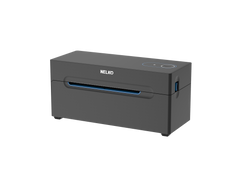
NELKO PL70E

User Manual

Keep your NELKO printer performing at its best with the latest drivers and firmware. Regular updates ensure compatibility with new operating systems, fix known issues, and unlock new features for a seamless printing experience.

English

Download

Platform Setup Guide

Download

Drivers & Firmware

Keep your NELKO printer performing at its best with the latest drivers and firmware. Regular updates ensure compatibility with new operating systems, fix known issues, and unlock new features for a seamless printing experience.

Windows

Download

Mac OS

Download

Sample

Keep your NELKO printer performing at its best with the latest drivers and firmware. Regular updates ensure compatibility with new operating systems, fix known issues, and unlock new features for a seamless printing experience.

4x6 Label

Download

Tutorial Videos

How to print wirelessly from phone to PL70e-BT printer

How to set up PL70e-BT on Mac (USB)

How to set up PL70e-BT on Windows (USB)

How to print with Chrome Book

How to customize 2 inch round label and print on PL70e BT

How to customize 2.25x1.25 inch label and print on PL70e BT

Design and print right from your phone

P21-IOS.webp__PID:8628a569-62d2-4d1d-b877-3780127ae88e

IOS App Store

P21.webp__PID:127ae88e-e5b7-4c90-8eb4-1a62c60a5a7a

Android Google Play

nelko_android.webp__PID:c60a5a7a-bc4e-4c9b-986b-4ab1cd2c5c78

Android APK

Frequently Asked Questions

How do I connect my Nelko printer to my phone?

To connect your Nelko printer to your phone, first ensure Bluetooth is enabled on your device. Open the Nelko app, select your printer model from the device list, and follow the on-screen pairing instructions. Once paired, the printer will remain connected for future use.

Why is my label not printing?

If your label is not printing, check that the printer has sufficient battery and that the label roll is loaded correctly. Verify the Bluetooth connection in the app and ensure the correct label size is selected. If the issue persists, try restarting both the printer and your phone.

What devices are compatible?

Nelko printers are compatible with most iOS and Android smartphones and tablets running iOS 9.0 or later and Android 4.4 or later. They also work with Windows and macOS computers via USB connection. Check your specific model's documentation for detailed compatibility information.

Copy of What devices are compatible?

Nelko printers are compatible with most iOS and Android smartphones and tablets running iOS 9.0 or later and Android 4.4 or later. They also work with Windows and macOS computers via USB connection. Check your specific model's documentation for detailed compatibility information.

Copy of Copy of What devices are compatible?

Nelko printers are compatible with most iOS and Android smartphones and tablets running iOS 9.0 or later and Android 4.4 or later. They also work with Windows and macOS computers via USB connection. Check your specific model's documentation for detailed compatibility information.

Copy of Copy of Copy of What devices are compatible?

Nelko printers are compatible with most iOS and Android smartphones and tablets running iOS 9.0 or later and Android 4.4 or later. They also work with Windows and macOS computers via USB connection. Check your specific model's documentation for detailed compatibility information.